
Download Advanced Call Center – call center software, caller ID, call recording, voice modem, phone call management, call filtering, personalized messages, email integration, fax integration, productivity tool
Overview
Advanced Call Center is a productivity-focused tool designed to streamline and enhance phone call management through integration with a voice modem. Originally released in 2007, the software targets users who require efficient control over incoming calls in both personal and professional settings. Its core purpose lies in transforming standard telephony into a structured, customizable, and data-rich experience. By leveraging features such as caller ID, call recording, and automated filtering, it helps users prioritize important communications while minimizing disruptions from unwanted calls.
The app is particularly useful for individuals or small businesses using older Windows systems who rely on voice modems for telephony functions. It serves as a foundational tool for managing communications without the need for modern cloud-based call centers. Real-world use cases include remote professionals managing client calls, administrative staff handling high-volume incoming lines, and users needing documentation of critical conversations. The software’s ability to integrate with external fax programs and send call logs via email adds practical utility in environments where paperless documentation and efficient follow-ups are essential.
Developed by Advanced Software, the application reflects a period when PC-based telephony was gaining traction. Although the developer did not provide additional technical details or current support information, the software’s continued relevance in niche markets highlights its functional stability. Within the broader app ecosystem, it stands as a legacy tool with enduring value for users still operating on legacy systems or requiring offline call management solutions.
Key Features & Functionality
- Caller ID Notifications: Displays caller information on-screen and uses voice synthesis to announce the caller’s name or number. This enhances accessibility and allows users to quickly identify calls without answering, improving response efficiency.
- Call Filtering via White and Black Lists: Enables users to block or prioritize calls based on predefined contact lists. This feature is especially beneficial for filtering spam or non-urgent calls while ensuring important contacts are always connected.
- Call Recording Capabilities: Records incoming and outgoing calls for documentation, verification, or training purposes. The recordings can be stored locally, providing a reliable audit trail for professional or legal use.
- Personalized Caller Messages: Allows users to play custom messages to callers before answering. This feature improves communication flow, sets expectations, and can be tailored for different contact groups.
- Email and Fax Integration: Automatically sends call details via email and interfaces with external fax software when a fax call is detected. This expands the software’s utility beyond voice calls, supporting hybrid communication workflows.
These features collectively support a more organized and proactive approach to phone management. For example, a small business owner could use the black list to filter telemarketers, record client conversations for reference, and send call summaries to team members via email. Similarly, a remote worker might use personalized messages to inform callers of their availability, reducing missed calls and improving professionalism.
Interface, UX & Performance
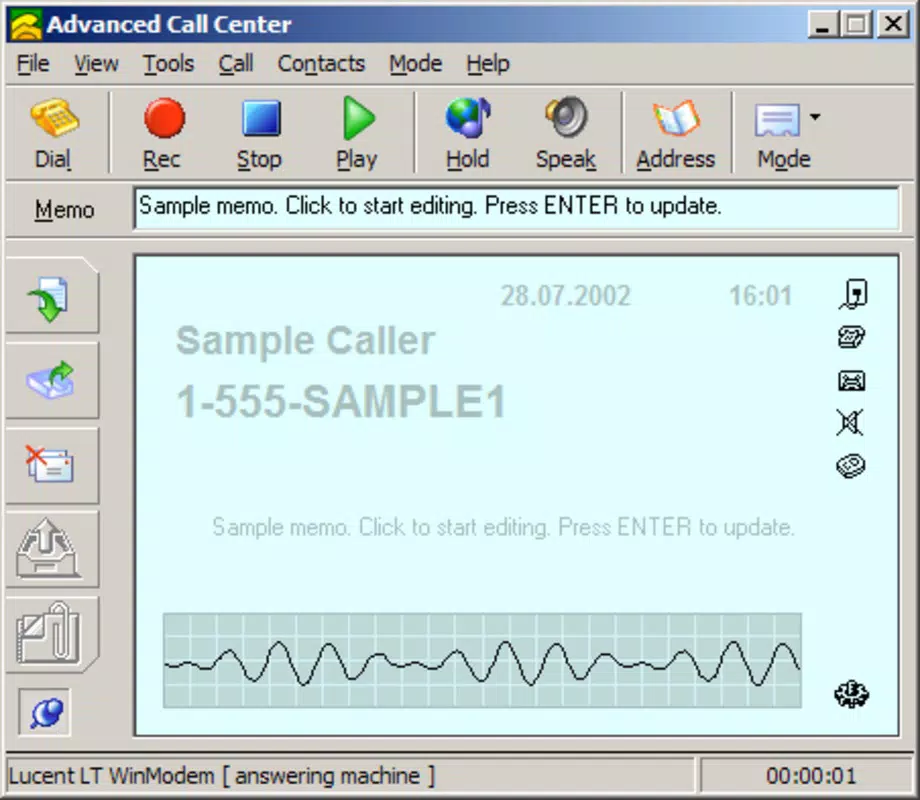
Advanced Call Center presents a straightforward interface designed for ease of use on older Windows systems. The layout prioritizes functionality over visual flair, with clearly labeled sections for caller ID, call logs, and filtering settings. Navigation is linear and intuitive, allowing users to access core features without extensive training.
The visual style reflects its 2007 origins, with a minimalist design that emphasizes utility. Menus are accessible via a central dashboard, and settings can be adjusted through simple toggle switches and input fields. Although the developer did not list formal performance metrics, the app’s small file size of 1.2 MB suggests efficient resource usage, likely making it compatible with low-end hardware.
Responsiveness appears to be consistent with its intended use on legacy systems. The software processes incoming calls in real time, with minimal delay in displaying caller information or initiating recordings. Stability is implied by its long-standing presence, though the lack of recent updates raises questions about long-term compatibility with modern operating systems. Users should expect optimal performance on older Windows platforms, but may encounter issues on newer versions without compatibility layers.
Platform Compatibility & Technical Requirements
Advanced Call Center is designed for the Windows platform and requires a compatible voice modem to function. The software version is 1.0.0, with a file size of 1.2 MB, indicating a lightweight footprint suitable for systems with limited storage.
The developer did not specify minimum OS requirements or compatibility with newer Windows versions. As such, users should exercise caution when attempting to install on modern systems. While it may run on Windows 7 or earlier via compatibility mode, no guarantees are provided. The software is not available on mobile platforms such as Android or iOS, limiting its accessibility to desktop users.
Given its age and niche functionality, the app is best suited for environments where legacy hardware and software are still in use. Users seeking a modern, mobile-first call management solution should consider alternatives, but those operating on older Windows systems may find Advanced Call Center a reliable option.
Pros and Cons
- Lightweight file size (1.2 MB) for minimal system impact
- Comprehensive call management with caller ID and recording
- Supports call filtering via white and black lists
- Integrates with email and external fax programs
- Free to download and use
- Released in 2007; no recent updates or modern support
- Not compatible with newer Windows versions without compatibility layers
- Requires a voice modem for full functionality
- Outdated interface may feel unfamiliar to modern users
- No mobile platform availability
FAQ
Is Advanced Call Center compatible with Windows 10 or Windows 11?
The developer did not specify compatibility with newer Windows versions. It may run on Windows 10 or 11 using compatibility mode, but this is not guaranteed.
Does the app require a voice modem to work?
Yes, Advanced Call Center requires a voice modem to enable caller ID, call recording, and other telephony functions.
Can I record calls on my smartphone using this app?
No, the app is designed for Windows desktop systems and is not available on Android or iOS platforms.
Is Advanced Call Center safe to download and install?
As a free tool released in 2007, it has been used by many users over the years. However, due to its age and lack of recent updates, users should scan the file with antivirus software before installation.
How do I update Advanced Call Center?
The software has not received updates since its initial release. Users are advised to use the current version (1.0.0) and consider alternative solutions for modern call management needs.
Final Thoughts
Advanced Call Center remains a niche but functional tool for users still relying on voice modem-based telephony within Windows environments. Its combination of caller ID, call recording, filtering, and integration capabilities makes it a valuable productivity utility for specific use cases. While its outdated interface and lack of modern support limit broader appeal, it continues to serve as a reliable solution for legacy systems.
For small businesses, remote workers, or individuals managing calls on older hardware, the app offers a cost-effective and straightforward way to enhance communication efficiency. Its free availability and minimal system requirements further strengthen its value proposition in constrained environments.
Download Advanced Call Center now


